





4.1
Free
Simple Sticky Notes
Notes that stay where you need them

View an ad to download for free
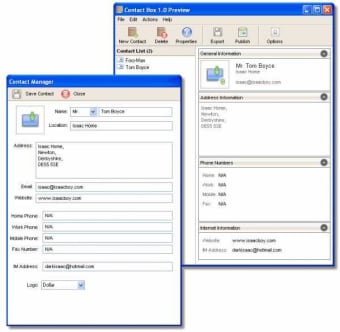
Manage and use your contact information in a powerful yet simple way. Contact features plenty of features and great technology that allows you to get the most out of your address book.
Bringing true innovation to the world of contact management, Contact allows you to effectively and easily start creating and managing your friends, family and business contacts. Contact packs a punch to when it comes to using your data effectively, with actions built straight into the user interface that allow you to quickly perform common tasks, like sending emails and writing letters to a contact.
One of the many features that makes Contact truly understandable and easy to use is its perfectly crafted user interface. With smooth icons and a mindful layout everything is always exactly where you would expect it to be. Free from clutter and super responsive Contact provides an all round refined user experience.
Many contact managers allow you to enter a whole plethra of information, which is great if you are a high flying business person with lots of data that you need on the go. But Contact offers all the information an everyday person would require, from multiple email addresses to nicknames. Everything you would expect and need in a contact manager is in Contact and theres none of the bloat.
Contact features a simple search system integrated right into the main application user interface. Just simply type something about the contact you wish to find, it doesn't matter what either, whether it be their name, address, telephone number, email or anything that Contact can store you will return results in a flash. Contact Smart Searching searches any string whether it be part of a name or a full name and is guranteed to find relevant results.
Share a computer with your family or at work? Not a problem for Contact if you are worried about the security of your data, just activate a high level encryption onto your contact database in a single click.
With a powerful Sync Manager built directly into the application you can share you data in seconds. Whether you want to share your contact information across 2 computers on a network or on computers anywhere in the world* you can do now in seconds flat**.
Exporting your data is also just as simple as doing anything else in Contact, simply press the export button and chose your file type and your away. You can share data in industry standard formats so for those who still aren't using Contact 1.5 can still get that all important info. Supported file types include plain text (.txt), vCard (.vcf), Isaac Database (.idb) and Comma Seperated Values (.csv).

Flexible address book with CRM features

Store contact information about your friends, family and colleges

Complete contacts agenda and phonebook
Free
1.5.2
Windows
Windows 2000
English
5.2K
4.41 MB
View an ad to download for free
Have you tried IS Contact? Be the first to leave your opinion!
Add reviewFree
Notes that stay where you need them
Paid
A tool that keeps your notes easily accessible

Trial version
Beat Those Frustrating Errors with DLL-Files Fixer

Free
A Free Calendar For Your Desktop Computer
Flexible address book with CRM features
Store contact information about your friends, family and colleges
Complete contacts agenda and phonebook

Contacts agenda for those on the move
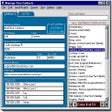
Keep track of addresses and phone numbers
Agenda, text editor, diary, email client...all in one!
Efficient Scheduling with MonoCalendar
Personal organizer to simplify your life
Free post-it notes with reminders

Popup Pad: Simplified Note-Taking Tool

Plan your family and school reunions to perfection
Advanced work planner and scheduler

Caja Basica: Financial Management Software
Complete contacts agenda and phonebook
Manage all your information from one place
Organize your time at college
Virtual post-it notes that can be synchronized via FTP





